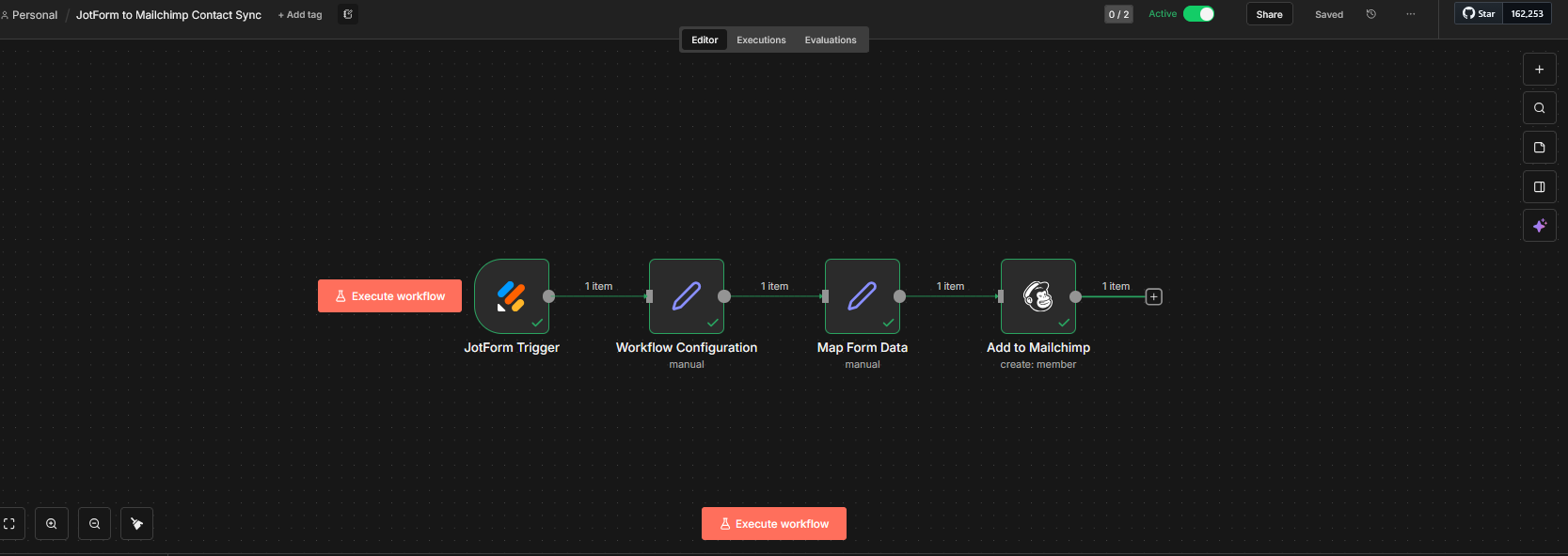
At Grin Reapers Automation, we focus on eliminating manual data handling and ensuring marketing systems stay perfectly in sync. One of our latest automation builds is a clean, reliable workflow that automatically syncs JotForm submissions directly into Mailchimp—ensuring every new lead is captured instantly without manual intervention.
This automation creates a seamless bridge between form submissions and email marketing, helping businesses grow their lists faster while maintaining clean, accurate data.
The Problem: Manual Contact Imports Waste Time and Create Errors
Many businesses rely on JotForm for lead capture but still manually:
- •Export form submissions
- •Upload CSV files
- •Copy/paste contacts
- •Clean mismatched fields
- •Fix formatting issues
This process is not only time-consuming, but it also introduces errors and delays—often causing missed follow-ups or incomplete subscriber data.
The goal was simple:
- Capture form submissions instantly
- Map data correctly every time
- Add contacts directly to Mailchimp
- Eliminate all manual steps
The Solution: A Real-Time JotForm → Mailchimp Sync
Using n8n, we built an automation that listens for new JotForm submissions and immediately creates or updates contacts inside Mailchimp.
The workflow is lightweight, fast, and designed for long-term reliability.
How the Automation Workflow Works
1. JotForm Trigger Detects New Submissions
The workflow begins with the JotForm Trigger, which fires automatically whenever a new form submission is received.
This ensures:
- •No polling delays
- •Real-time data capture
- •Immediate downstream actions
2. Workflow Configuration Node
This step defines workflow-level settings such as:
- •Target Mailchimp audience
- •Required field structure
- •Optional tagging or segmentation logic
Keeping configuration centralized makes the automation easy to update and reuse.
3. Form Data Mapping & Cleanup
Before sending data to Mailchimp, the workflow:
- •Maps JotForm fields to Mailchimp merge tags
- •Cleans formatting inconsistencies
- •Ensures required fields (like email) are valid
- •Prepares the payload for Mailchimp's API
This step guarantees accuracy and prevents failed submissions.
4. Add Contact to Mailchimp Automatically
The final step creates a new contact in Mailchimp (or updates an existing one if already present).
Each submission is:
- •Added instantly
- •Properly formatted
- •Ready for email campaigns or automations
No duplicates. No delays. No missed leads.
The Results
Instant Contact Sync
New leads appear in Mailchimp within seconds of form submission.
Zero Manual Work
No exports, imports, or CSV handling required.
Clean, Consistent Data
Every field is mapped correctly, reducing errors and bounce risks.
Improved Follow-Up Speed
Contacts can immediately enter email sequences or automations.
Scalable for Multiple Forms
The workflow can easily support additional forms, audiences, or tags.
Why This Automation Matters
Email marketing is only effective when your list is accurate and up to date. This automation ensures:
- Faster response times
- Better subscriber experience
- Higher campaign engagement
- Reduced operational overhead
Instead of managing data, teams can focus on messaging, strategy, and growth.
Ready for Expansion
This workflow can be extended with additional features, including:
- Tagging contacts based on form answers
- Routing submissions to different Mailchimp audiences
- Syncing data to CRMs or Google Sheets
- Triggering internal notifications
- Starting automated email sequences instantly
It can also be packaged as a repeatable, client-ready automation for service businesses, agencies, or SaaS products.
Final Thoughts
This JotForm to Mailchimp automation is a perfect example of how small, focused workflows can deliver massive value. By removing friction between lead capture and email marketing, businesses gain speed, accuracy, and confidence in their systems.
At Grin Reapers Automation, we build these systems so marketing runs smoothly in the background—without constant manual effort.
If you'd like a similar automation built for your business, we can customize it to fit your exact tools and workflow.
Ready to Automate Your Lead Capture?
Let's build a custom automation that connects your forms directly to your email marketing platform. From JotForm to Mailchimp, Typeform to ActiveCampaign, or any other combination—we create seamless integrations that eliminate manual data entry.