Automated FAQ & JSON-LD Schema Generation for WordPress Using n8n
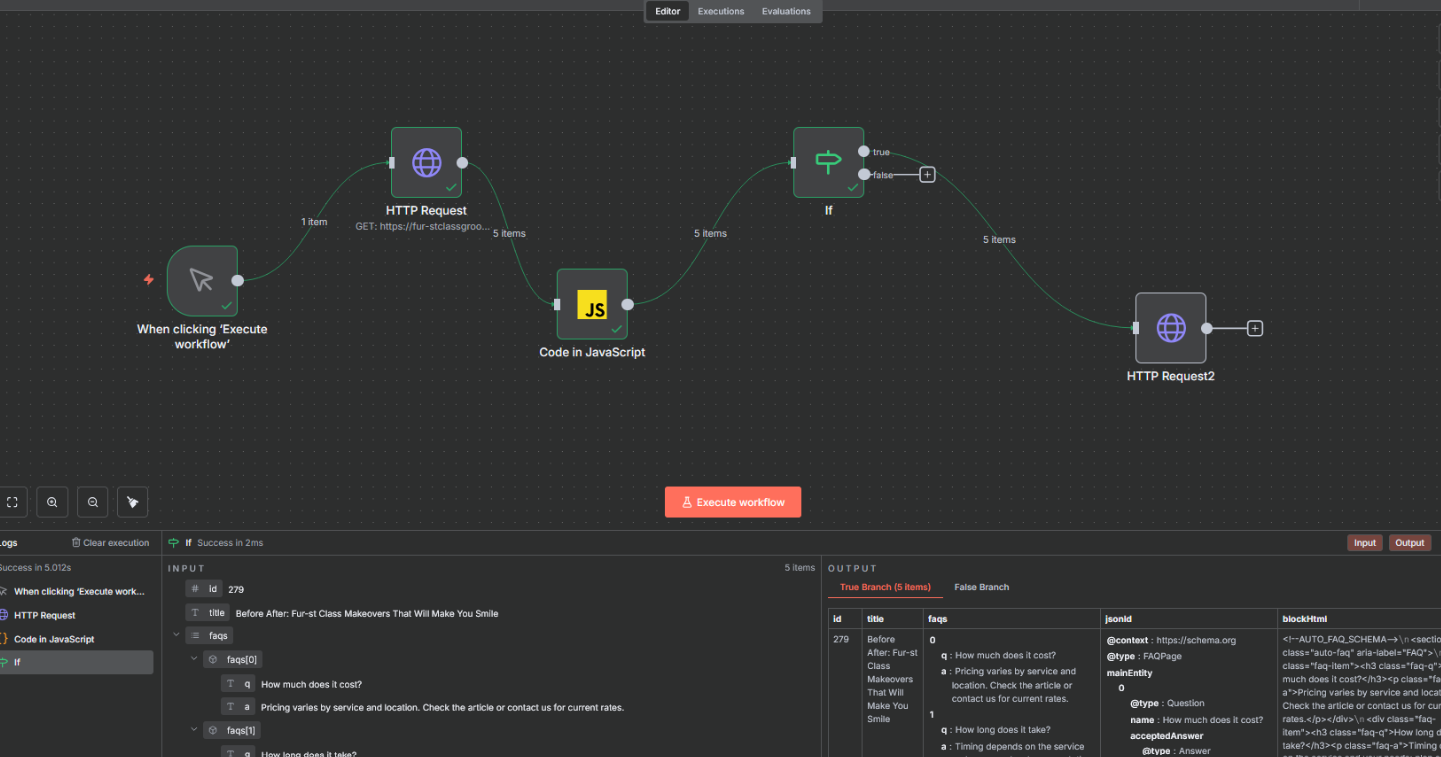
At Grin Reapers Automation, we specialize in building systems that enhance content quality, boost SEO performance, and reduce manual work for businesses. Our latest automation project is a powerful workflow designed to automatically generate FAQs and structured data (JSON-LD schema) for WordPress blog posts — saving time, improving search visibility, and ensuring every article is fully optimized.
This automation scans each article, creates relevant FAQs, builds properly formatted JSON-LD schema, inserts everything into the post, and updates it automatically — all while skipping posts that already contain FAQs.
This is a major efficiency upgrade for content-heavy websites.
The Challenge: Manual SEO Enhancements Take Too Much Time
Google rewards well-structured content. Adding FAQs and structured schema markup improves:
- Search appearance
- Click-through rate (CTR)
- Featured snippet visibility
- Overall SEO performance
But doing this manually for every blog post is time-consuming. A single article may take 10–20 minutes to:
- Analyze the content
- Write helpful FAQs
- Format them consistently
- Generate JSON-LD schema
- Insert everything into WordPress
- Test the update
Multiply that by dozens or hundreds of articles, and the workload becomes overwhelming.
Our goal was simple:
- Make this entire process automatic
- Keep quality high
- Ensure posts are only updated when needed
The Solution: A Fully Automated FAQ + Schema Generator Workflow
Using n8n, we built a smart system that handles everything from content analysis to WordPress update — with no manual effort required.
Here's how it works:
1. The Workflow Scans a WordPress Post
The automation begins by retrieving key post data:
- Post ID
- Title
- Content
- Existing custom fields
This allows the system to check whether FAQs already exist and prevents unnecessary updates.
2. AI Analyzes the Article and Generates 3–5 FAQs
Using AI, the system reads the content and creates:
- Natural language questions
- Clear, relevant answers
- Topic-appropriate formatting
These FAQs are tailored to the post, not generic templates.
Example outputs:
How much does it cost? – Pricing varies by service and location…
How long does it take? – Timing depends on the complexity of the service…
Each FAQ set is stored in a structured format so it can be used to build both human-readable content and JSON-LD schema.
3. The Workflow Builds the JSON-LD Schema Automatically
The system formats the FAQ data into a Google-friendly schema block like this:
{
  "@context": "https://schema.org",
  "@type": "FAQPage",
  "mainEntity": [
    {
      "@type": "Question",
      "name": "How much does it cost?",
      "acceptedAnswer": {
        "@type": "Answer",
        "text": "Pricing varies by service and location…"
      }
    }
  ]
}
This ensures full compatibility with Google's structured data requirements.
4. n8n Inserts the FAQs Into the WordPress Post
The workflow automatically:
- Adds the FAQs to the bottom of the post
- Wraps them in consistent HTML
- Includes appropriate headings and styling
Your content becomes richer, more helpful, and more SEO-friendly — without lifting a finger.
5. The Workflow Updates the Post
Once FAQs and schema are generated:
- The WordPress post is updated via API
- New content is injected
- Schema is added to a custom field
- Post is instantly optimized
If the post already contains FAQs, the workflow intelligently skips it to avoid duplicates.
The Outcome: Faster Content Optimization With Strong SEO Benefits
Better Search Visibility
Google can display FAQ-rich snippets directly in SERPs.
Complete Automation
What previously took 10–20 minutes per post now happens in seconds.
Consistency Across All Posts
Every article gets clean, structured FAQs and schema.
SEO-First Approach
Search engines understand your content better — improving rankings over time.
Smart Updating
Only relevant posts are modified, preventing unnecessary API calls or overwriting.
Why This Automation Matters
For any website publishing consistent content — blogs, tutorials, reviews, service pages — structured data is essential. But adding it manually is tedious.
This automation:
- Reduces workload
- Eliminates human error
- Ensures every post meets SEO best practices
- Speeds up optimization dramatically
It's the perfect example of how automation can multiply your output while maintaining (or even improving) quality.
Final Thoughts
With this n8n-powered workflow, our client now has a fully automated system that:
- Reads every WordPress article
- Generates relevant FAQs
- Creates JSON-LD schema
- Formats the content
- Updates the post
- Skips posts that are already optimized
It's efficient, scalable, and designed to improve long-term SEO results with zero ongoing work.
If you'd like a similar system for your blog, WordPress site, or content team — we can build it.
Ready to Automate Your Content SEO?
Contact Grin Reapers Automation to build a custom FAQ and schema generation workflow for your WordPress site.
Related Articles
How We Built a Fully Automated Blog Generation System
Learn how n8n and Google Gemini automate content creation workflows.
Automated Web Scraping Workflow for Distributors
Discover how n8n automates research and data collection workflows.
What Is N8N and How Can It Run Your Marketing in the Background?
Discover the power of N8N for building custom automation workflows.